







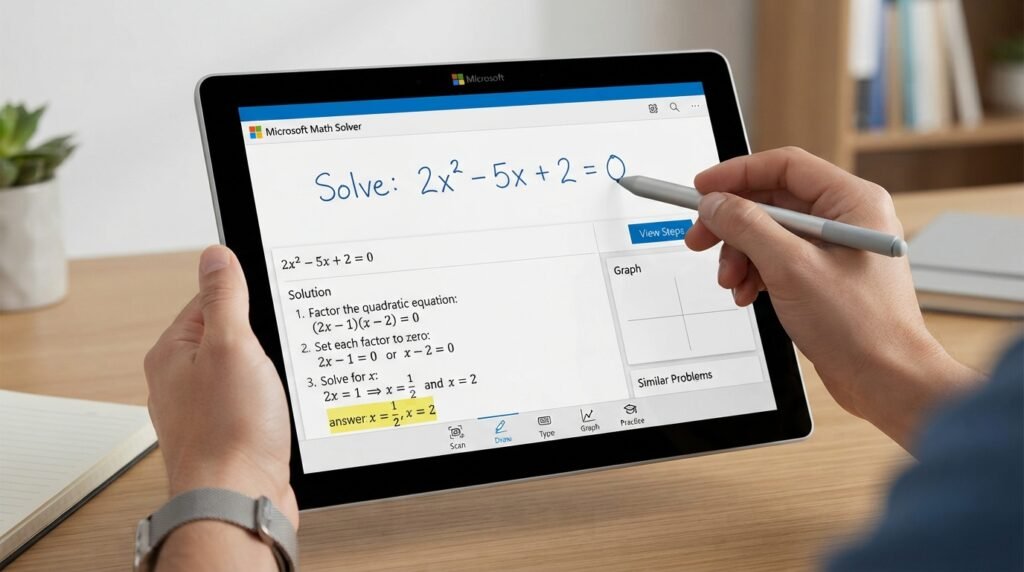


Mathematics can become frustrating when a problem looks simple at first but quickly turns into a complicated equation. Whether you are a school student working through algebra, a college student studying calculus, or simply someone who wants to check a calculation, having a reliable digital math tool can make the process much easier. Microsoft Math Solver is designed to help users solve mathematical problems while providing explanations that can make the solution easier to understand.
Unlike a basic calculator that only gives an answer, Microsoft’s math-solving technology focuses on showing the process behind many problems. Users can enter equations manually, type mathematical expressions, or use other supported input methods depending on the version and platform they are using. The service can handle a broad selection of mathematical topics, including arithmetic, algebra, trigonometry, statistics, and calculus.
The biggest advantage is convenience. Instead of spending several minutes trying to remember a formula or locate a mistake in your working, you can enter the problem and examine the generated solution. Used correctly, this makes the tool useful not only for getting answers but also for reviewing mathematical concepts and improving problem-solving skills.
What Is Microsoft Math Solver?
Microsoft Math Solver is a digital mathematics problem-solving tool developed by Microsoft. It is intended to help users work through mathematical expressions and understand how solutions are reached. It has been particularly useful for students who want additional assistance while studying independently.
The tool supports many common areas of mathematics. Depending on the problem, it can work with expressions involving arithmetic, algebra, equations, inequalities, trigonometry, graphs, and other higher-level mathematical concepts. Its solution-oriented approach makes it different from a conventional calculator.
A useful way to think about it is as a mathematical study assistant. You provide a problem, and the system analyzes the expression before presenting a solution or explanation when available. This can help users identify the mathematical rules involved rather than simply copying a final number.
“The best math tool is not the one that gives an answer fastest, but the one that helps you understand why the answer is correct.”
For learners, that distinction matters. A correct answer is useful, but understanding the process is what helps you solve similar questions independently later.
How Microsoft Math Solver Works
The basic process is straightforward. A user enters a mathematical problem into the available interface, and the system interprets the expression before attempting to solve it. For a simple calculation, the result may appear almost immediately. More complicated questions can produce additional steps or supporting information.
For example, imagine you need to solve an equation such as:
2x + 8 = 20
The solver can determine that subtracting 8 from both sides gives 2x = 12, followed by dividing both sides by 2 to reach x = 6. Seeing this sequence is more educational than simply being told that x equals 6.
The same principle can apply to more advanced problems. Depending on the expression, the platform may provide formulas, graphs, related mathematical concepts, or explanations that help put the result into context.
This makes the experience particularly useful when checking homework. Students can compare their own working with the generated solution and identify the exact point where their method went wrong.
Key Features of Microsoft Math Solver
One of the strongest aspects of Microsoft’s math-solving platform is its range of features. It is not limited to addition, subtraction, multiplication, and division. The service is designed around a much wider collection of mathematical problems.
Some of the important capabilities include:
| Feature | What It Helps With |
|---|---|
| Equation solving | Algebraic equations and expressions |
| Step-by-step explanations | Understanding solution methods |
| Graphing | Visualizing mathematical relationships |
| Calculations | Everyday arithmetic and numerical problems |
| Algebra | Expressions, equations, and inequalities |
| Trigonometry | Trigonometric expressions and problems |
| Calculus | Selected derivatives, integrals, and related problems |
| Statistics | Selected statistical calculations |
| Multiple input methods | Convenient problem entry |
The availability of a particular feature can depend on the current Microsoft product experience, platform, or type of mathematical problem. Still, the overall goal remains the same: make mathematical problem solving more accessible.
Another valuable feature is visual learning. Graphs can help students understand how equations behave instead of treating mathematics as nothing more than symbols on a page.
Why Students Use Microsoft Math Solver
Students often struggle with mathematics because a textbook explanation may not match the way they personally understand a concept. A digital solver can provide another perspective when they are stuck.
For example, suppose a student understands basic algebra but becomes confused when working with quadratic equations. Entering a problem into Microsoft Math Solver can provide an opportunity to compare the student’s method with a generated solution. This can reveal whether the mistake came from factoring, rearranging terms, simplifying, or applying a formula incorrectly.
It can also save time during revision. Rather than checking every calculation manually, students can use the tool to verify selected answers and then concentrate their attention on questions they find difficult.
However, the best results come when the solver is treated as a learning aid rather than a shortcut.
Microsoft Math Solver for Algebra
Algebra is one of the areas where a mathematical solver can be especially helpful. Algebra requires students to understand relationships between variables, expressions, equations, and mathematical operations.
A learner might enter a linear equation, quadratic expression, inequality, or another supported algebraic problem and receive a solution. When working through equations, seeing intermediate steps can reinforce important principles such as performing the same operation on both sides of an equation.
For instance, if a student is solving:
3x – 5 = 16
the key steps involve adding 5 to both sides and then dividing by 3. A solver can help demonstrate that sequence clearly.
This becomes even more valuable when problems become complicated. Instead of guessing which operation should come first, students can examine the solution structure and then try a similar question themselves.
Using Microsoft Math Solver for Graphs
Graphs turn mathematical relationships into visual information. This is particularly useful for students who understand concepts more easily through images than through equations alone.
A graph can show how a function changes as the input changes. For example, a linear equation produces a straight-line relationship, while a quadratic function can create a curved parabola. Seeing these patterns can make abstract concepts easier to remember.
Microsoft Math Solver can therefore be useful when studying coordinate geometry and functions. Instead of simply looking at an equation, students can explore what that equation represents visually.
Graphing is also helpful for comparing equations. Two expressions that look similar on paper can behave very differently when represented visually, and a graph can make that difference immediately obvious.
Microsoft Math Solver for Advanced Mathematics
The usefulness of the platform extends beyond elementary arithmetic. Students studying more advanced mathematics may encounter topics involving trigonometry, calculus, statistics, and functions.
For calculus learners, digital assistance can be useful when reviewing concepts such as derivatives or integrals. Rather than relying entirely on memory, students can use a solver to check their work and investigate how a solution was produced.
Trigonometry students can similarly benefit when working with identities, equations, angles, and functions. Statistics problems may also be easier to verify with digital assistance, particularly when calculations contain several steps.
That said, advanced mathematics often requires interpretation, not just calculation. A generated answer should therefore be considered one part of the learning process rather than the complete lesson.
Benefits of Microsoft Math Solver
There are several reasons a digital math assistant can be valuable for learners. The first is accessibility. Students can quickly check problems without needing a physical calculator or waiting for someone else to explain the question.
Another major advantage is immediate feedback. When studying alone, one of the biggest challenges is knowing whether your answer is correct. A solver provides another point of reference and can help identify errors.
It can also support independent learning. If a student encounters an unfamiliar type of equation, the generated solution can serve as a starting point for understanding the underlying method.
The main benefits include:
- Fast mathematical calculations
- Support for multiple areas of mathematics
- Helpful solution explanations
- Visual graphing capabilities
- Convenient homework checking
- Support for independent study
- Assistance with difficult mathematical expressions
These advantages explain why online math-solving tools have become increasingly popular among students.
Limitations You Should Know About
No automated mathematics tool should be considered perfect. A solver may interpret a complicated expression differently from what the user intended, particularly when the input is unclear or incorrectly formatted.
There is also a difference between obtaining a solution and understanding it. A student who repeatedly enters homework questions without studying the method may improve short-term results while failing to develop long-term mathematical skills.
Another consideration is that not every advanced problem will necessarily receive the same level of explanation. Some expressions may produce a detailed solution, while others may provide limited information.
For that reason, students should verify important answers and consult teachers, textbooks, or other educational resources when something does not make sense.
Microsoft Math Solver vs. a Traditional Calculator
A traditional calculator is excellent for numerical calculations. If you need to multiply several numbers, calculate a percentage, or evaluate a basic expression, a calculator may be all you need.
A mathematical solver is different because it can focus on symbolic expressions and mathematical procedures. Instead of only calculating the final number, it can help demonstrate how an equation can be solved.
| Traditional Calculator | Microsoft Math Solver |
|---|---|
| Primarily numerical calculations | Mathematical expressions and problems |
| Usually gives a direct result | Can provide solution steps |
| Limited educational explanation | Designed with learning assistance in mind |
| Excellent for quick arithmetic | Useful for equations and mathematical concepts |
| Limited visualization | Can support graphing |
Neither tool completely replaces the other. The best choice depends on what you are trying to accomplish.
How to Use It as a Learning Tool
The smartest approach is to attempt a problem yourself before using a digital solver. Write down the formula you think applies and work through as many steps as you can.
Afterward, enter the same problem and compare the result. If your answer is different, do not immediately erase your work. Instead, look for the first step where your method differs from the generated solution.
This habit turns a solver into a feedback mechanism. Over time, you can identify recurring mistakes, such as sign errors, incorrect distribution, forgotten brackets, or improper fraction handling.
A simple study routine can be:
Try → Check → Compare → Understand → Practice
This approach is far more valuable than simply copying an answer.
Tips for Getting Better Results
Clear input is important when working with any automated math system. Make sure fractions, exponents, parentheses, and mathematical symbols are entered correctly.
If a problem contains multiple parts, solve or check each section separately when possible. Breaking a complicated expression into smaller components can make it easier to understand both the question and the resulting solution.
You should also avoid relying exclusively on automated answers. After seeing a solution, close the tool and try a similar problem without assistance. If you can solve the new question independently, you have actually learned something.
Another useful habit is to keep a list of mistakes. If you repeatedly make errors with negative numbers or quadratic equations, spend additional study time on those topics rather than simply checking more answers.
Is Microsoft Math Solver Good for Homework?
It can be useful for homework when it is used responsibly. Students can use it to check calculations, understand difficult steps, and review mathematical concepts that they have already attempted.
The important issue is how the tool is used. Copying an entire generated solution and submitting it as your own work does not provide the same educational value as studying the method and then completing a similar problem independently.
Teachers may also have different policies regarding digital assistance. Students should follow the rules for their particular class or assignment.
Used as a tutor-like reference rather than an answer-copying machine, the technology can be a valuable part of a broader study routine.
Microsoft Math Solver and Online Math Learning
Online learning has changed the way students approach difficult subjects. Instead of depending entirely on classroom time, learners can now combine textbooks, videos, practice websites, calculators, and interactive tools.
A mathematical solver fits into this larger ecosystem. It can provide immediate assistance when a learner is stuck, while other resources can provide deeper explanations and structured lessons.
The most effective learning strategy combines these resources. Use explanations to understand the concept, practice problems to develop skill, and a solver to verify your reasoning when necessary.
This creates a more balanced approach to mathematics and reduces the temptation to rely on a single tool for every question.
Who Can Benefit From Microsoft Math Solver?
The platform can be useful for a wide range of learners. School students may use it for arithmetic and algebra, while older students can explore more advanced mathematical topics.
Parents can also find mathematical solvers useful when helping children with homework, especially when they want to verify a calculation before explaining it. Teachers and tutors may use similar tools as supplementary resources when preparing examples or checking solutions.
Even adults who have not studied mathematics for years can benefit. Whether calculating an equation for work, refreshing an old concept, or simply satisfying curiosity, an accessible digital math assistant can make the process less intimidating.
The Future of AI-Powered Math Tools
Mathematical software continues to become more sophisticated. Modern systems are increasingly capable of interpreting natural language, recognizing mathematical expressions, generating visual explanations, and adapting information to different learning needs.
The future is likely to focus not only on producing correct answers but also on explaining those answers in ways that different learners can understand. This could make digital mathematics tools increasingly valuable in personalized education.
Still, technology cannot replace mathematical thinking. Knowing why a formula works, recognizing which method to use, and checking whether an answer makes sense remain important human skills.
The ideal future is therefore not humans versus technology. It is students using technology to become better mathematical thinkers.
Common Mistakes When Using a Math Solver
One common mistake is entering an expression incorrectly. A missing bracket or incorrectly positioned exponent can completely change the problem.
Another mistake is accepting every generated answer without checking whether it makes sense. Students should always consider the original question and determine whether the result is reasonable.
There is also a tendency to become dependent on instant solutions. If every difficult problem is immediately entered into a solver, the learner loses opportunities to develop persistence and problem-solving ability.
A better strategy is to struggle productively for a while, attempt the problem, and then use technology when genuine assistance is needed.
Conclusion
Microsoft Math Solver can be a powerful companion for students, teachers, parents, and anyone who wants additional support with mathematics. Its ability to work with different types of mathematical expressions, provide solution assistance, and support visual learning makes it more than a basic calculator.
The most important benefit, however, comes from using the technology correctly. Instead of treating the tool as a shortcut to homework answers, use it to check your reasoning, discover mistakes, understand unfamiliar methods, and practice similar problems.
Mathematics becomes easier when technology supports learning rather than replacing it. With the right approach, a digital math solver can help turn confusing equations into understandable steps and make independent study much more manageable.
FAQ
What is Microsoft Math Solver?
Microsoft Math Solver is a Microsoft-developed digital mathematics tool that helps users work through mathematical problems. It can support areas such as arithmetic, algebra, trigonometry, graphing, and selected advanced mathematical topics.
Is Microsoft Math Solver free to use?
The availability and features of Microsoft’s math-solving experiences can vary by product and platform. Many of its core mathematical assistance features have historically been available without requiring users to purchase a dedicated math-solving subscription.
Can Microsoft Math Solver solve algebra problems?
Yes, Microsoft Math Solver is designed to handle many common algebra problems, including equations and expressions. Depending on the problem, it may also provide steps that help users understand how the solution was reached.
Can Microsoft Math Solver show graphs?
Yes, graphing is an important part of the platform’s mathematical capabilities. Graphs can help users visualize equations and functions, making abstract mathematical relationships easier to understand.
Is Microsoft Math Solver good for students?
Microsoft Math Solver can be very useful for students when used as a learning and checking tool. It can help explain difficult problems, verify answers, and provide another way to study mathematical concepts.
Can Microsoft Math Solver help with calculus?
It can assist with selected calculus-related problems, although the depth of support can vary depending on the exact question and current platform capabilities. Students should use additional textbooks, lessons, or instructor guidance for deeper calculus concepts.
Should I use Microsoft Math Solver to do my homework?
It is better to use Microsoft Math Solver to understand and check homework rather than simply copy its answers. Attempting the problem first and then comparing your work with the generated solution provides much greater educational value.
What makes Microsoft Math Solver different from a calculator?
A standard calculator primarily performs numerical operations, while Microsoft Math Solver is designed to work with broader mathematical problems and can provide explanatory or visual assistance. This makes it particularly useful for learning and checking mathematical reasoning.